Certain questions in Parable assessment protocols can be designated as Deferrable questions, which can be saved and completed separately from imaging and measurements captured during an encounter.
Assessments that contain deferrable questions will offer the option to "Save and complete later" after imaging and measurements have been entered. Selecting this option will allow the user who initiated the assessment (or an Admin/Clinical Manager) to resume and finish the Incomplete Assessment at a later time.
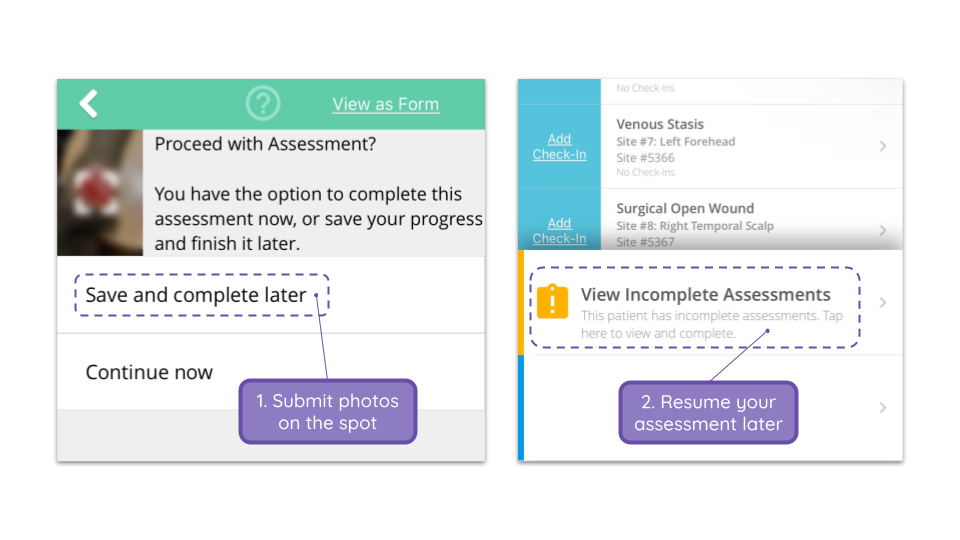
Imaging, measurements, and partial responses will be synced on the spot, allowing users to save time when documenting multiple wounds during an encounter.
If you are interested in enabling this functionality at your facility, please reach out to support@parablehealth.com.
Saving and Resuming Incomplete Assessments
During an assessment in Parable, after imaging, measurements, and designated non-deferrable questions are answered, you will see a "Proceed with Assessment?" question with two options:
-
'Save and complete later'
- You will proceed to the submit screen where you can enter an optional comment and tap submit. Imaging, measurements, and non-deferred questions will be synced to the web, and the assessment will be stored as an Incomplete Assessment
-
'Continue now'
- You will proceed with the remaining assessment questions and submit a full, complete assessment
A list of all Incomplete Assessments (across patients) can be accessed via the Sidebar in the Parable mobile app.
Incomplete Assessments belonging to a given patient will be highlighted on their Patient Profiles in the Parable mobile app:
Incomplete Assessments cannot be completed on the web and must be resumed using the Parable mobile app.
On the Parable website, you will see a banner notification at the top of the screen if there are any Incomplete Assessments in your Region.
Note: certain mandatory or non-deferrable questions (i.e. time-sensitive questions or treatment/dressing questions) require answering before the remaining full assessment can be saved as an Incomplete Assessment.
Skipping vs. Deferring Assessments
In order to save an assessment for later completion, it first has to be initiated by selecting "Yes, complete full assessment" when you are prompted for a full clinical wound assessment.
If you chose to skip clinical questions by selecting "No, submit only photos + measurements," you will not have the option to save and complete the assessment later.
Notifications